 Network Backup & Restore Software Solution for SMBs |
|||
| EN PL ES | |||
|
Article reference: FS-FBS-20101006-I01 Last revision : 14 October 2013 Version : 1.4 Ferro Backup System installation under Linux and Mac OS XThe article discusses how to install and run Ferro Backup System in Linux, BSD and Mac OS X using a Wine environmentIntroductionFerro Backup System requires a WinAPI programmer's interface to run. WinAPI is a set of libraries enabling the application to load, launch and interract with the operating system and other programs. This Interface is not available by default in Unix-like systems. To enable Win32 to launch in systems other than Windows, install an adequate WinAPI implementation for a given operating system.Wine is an implementation of a WinAPI programmer's interface including a loader and libraries required to run Windows on Linux and other operating systems compatible with POSIX. 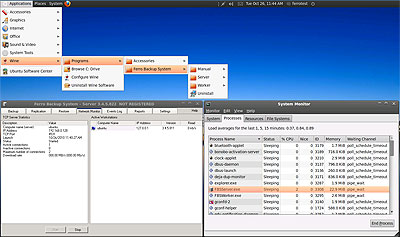
Fig. 1 Ferro Backup System running under Ubuntu 10.04 LTS (Lucid Lynx) See below for steps necessary to run FBS Server and FBS Worker in Linux, BSD and Mac OS X. 1. Wine environment installationThe installation consists in downloading the appropriate installation package for a given operating system (deb, rpm, etc...) Wine and installation as per the instructions described on the project's website: www.winehq.org/download/2. Ferro Backup System installationa) Systems with graphical shell (GUI)Ferro Backup System installer runs under Windows and U*IX/Wine. The installation process is the same in both cases and is described on page Installing backup softwareb) Systems with text shell (CLI)If there is no graphical shell in the system, the program must be installed manually. Program files, mentioned below, may be copied from the computer, on which a standard installation was run (point a).
3. System services operation (advanced)Wine launches system services only after a user logs in to the system and launches any WinAPI application (e.g. cmd.exe, clock.exe). Once all applications running under Wine have been closed, services are also stopped.If you want FBS Worker and FBS Server services to be launched automatically on Linux/Mac OS X startup, even without a graphic environment running and to prevent system services from being stopped on closing all applications using Wine, add the following command to one of the startup scripts, e.g. to /etc/rc.local file. su - ACCOUNT_NAME -c "/full_path/wineserver -p; wine winver"Example: su - ROOT -c "/usr/lib/i386-linux-gnu/wine/wineserver -p; wine winver" Known limitationsList of functionalities not available in Linux and Mac:
|
||
Home Help Where to Buy
Download
Contact Us
Partners |
Printable version |
Language: EN  PL PL 
|
|||
|
Network Backup System installation under Linux and Mac OS X All rights reserved. Copyright © 2000-2022 FERRO Software |
|||


