 Network Backup & Restore Software Solution for SMBs |
|||
| EN PL ES | |||
|
Network backup and restore system documentationFerro Backup System™is based on client-server architecture. Those are two separate programs: the server - FBS Server and the client - FBS Worker.Installation location You only run FBS Server once on the computer which will be used as the backup server, while FBS Worker needs to be installed on workstations that is on all computers from which you want to back up any information (office computers, portable computers, file servers, database servers etc.) 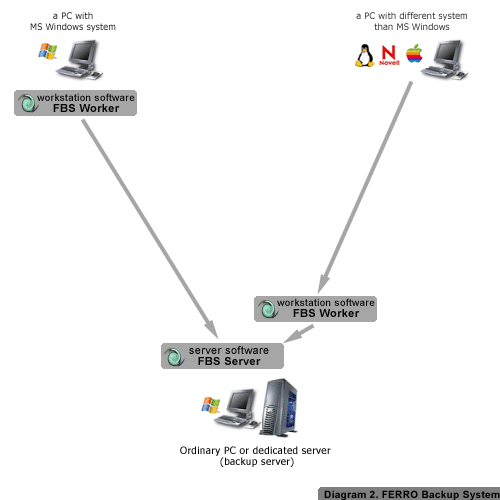
DIAGRAM 2. Ferro Backup System™ - Client and server installation locations depend on the operating system version. If the computer from which you want to back up any information works under a system different than MS Windows, its resources can be backed up using mapped network drives. You can back up files from such a computer from any workstation under MS Windows. Often it is best to install the workstation software - FBS Worker - also on the backup server, as shown on diagram 2. Main task - backup The main function of FBS Server is to send backup tasks to workstations at appropriate times. Such a task includes information on data to be backed up (files, folders) and what type of backup should be used ( full backup or differential backup ). After a task is received, the workstation will look for files to be backed up and then start compressing them (a ZIP archive will be created). The newly created archive will be transferred to the backup server. 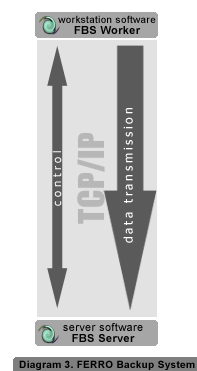
DIAGRAM 3. Ferro Backup System™ - Transfer of data between a workstation and the backup server. FBS Server receives the transmitted ZIP archive file piece by piece and saves it on the server disk. After receiving the last segment the server verifies the archive by checking checksums of compressed files. This procedure may be followed at the same time by all workstations operating within the System. Task scheduling, that is telling each station when and what to back up can be carried out from a single place in FBS Server. The program’s console also lets the user monitor the entire System, configure it, verify scheduled tasks based on the event log and restore data. Backup file location. Backup archives are stored on the hard disk in a folder specified in the Settings tab in the central module of FBS Server. For each workstation a subfolder FBF is created here, whose name includes the name of the workstation plus the .FBF extension (Ferro Backup Folder). ZIP files are saved in those subfolders, and their names have the following format: DATEfbsTIME.zip. Ferro Backup System™ stores data in the PKZIP format (64-bit) created by PKWARE, Inc. The ZIP64 format enables the creation of archives (single .zip files) sized up to 9 exabytes (1 EB = 1,000,000 TB). .zip files can be viewed and unpacked using a variety of programs supporting the PKZIP ZIP64 format, for example the popular WinZip®. Considering the differential backup model used by Ferro Backup System™ it is, however recommended to perform those steps directly in FBS Server (Restore tab). Easy data restore Ferro Backup System™ supports full backups and differential backups. Nevertheless, whatever backup type you choose selected for your workstation, the restore procedure is always carried out in the same, user-friendly way. While for full backups the restore process is simple, involving only the unpacking of all files from a selected archive (ZIP), for differential backups it is a little more complicated. In the latter case, only the first (the oldest) archive contains all the files originally selected in the backup settings. During all subsequent backup sessions only files modified or created since the previous backup are included. If backups from subsequent days do not include all files selected in the backup settings, then restoring data in most backup systems may prove very difficult. Ferro Backup System™ automatically handles the entire restore process, which enables the user to easily restore information differential backups, just like in the case of full backups. |
||
Home Help Where to Buy
Download
Contact Us
Partners |
Printable version |
Language: EN  PL PL 
|
|||
|
Backup and restore - Ferro Backup System - backup software, file backup All rights reserved. Terms and Conditions | Privacy Policy Copyright © 2000-2024 FERRO Software |
|||


