Network Backup & Restore Software Solution for SMBs |
|||
| EN PL ES | |||
|

Upgrade terms for version 7.xFree upgradesA free upgrade to version 7.x is available to all customers who purchased a new license (not an upgrade) for Ferro Backup System 6.x after May 8, 2025. The license generation date can be found in the license key file (*.flk).There is no need to notify FERRO Software about the upgrade. License keys for version 6.x generated after May 8, 2025 can also be used with Ferro Backup System 7.x. Paid upgrades with a 50% discountA 50% discount on the purchase of a Ferro Backup System 7.x license is available to all customers who hold a valid license for Ferro Backup System 6.x.To receive the discount, select the "Upgrade from version 6.x" option when placing your order. Once your details have been verified, you will receive an invoice with the 50% discount, followed by a license key for Ferro Backup System 7.x. Special offer valid only until September 30: When upgrading, you can also extend your license by adding more workstations or upgrade to a higher edition (for example, from Std to Pro) with a 50% discount. In the order form, enter a higher number of workstations, servers or hosts, or select a different edition—the 50% discount will be applied automatically. Paid upgrades with a 25% discountA 25% discount on the purchase of a Ferro Backup System 7.x license is available to all customers who hold a valid license for Ferro Backup System 5.x, 4.x or 3.x.To receive the discount, select the "Upgrade from an older version" option when placing your order. Once your details have been verified, you will receive an invoice with the 25% discount, followed by a license key for Ferro Backup System 7.x. Special offer valid only until September 30: When upgrading, you can also extend your license by adding more workstations or upgrade to a higher edition (for example, from Std to Pro) with a 25% discount. In the order form, enter a higher number of workstations, servers or hosts, or select a different edition—the 25% discount will be applied automatically. Technical informationTo upgrade the software from version 6, download the latest version 7 release and perform a manual update using the downloaded file (1).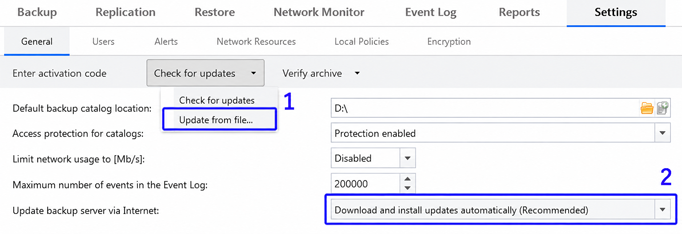
Automatic updates work only within the same major version of the software, for example, from 7.0 to 7.1 or from 6.6 to 6.7. Upgrading to a newer major version, for example, from 6.x to 7.x, must be performed manually on the backup server only. Updating the server does not result in any loss of settings—the existing configuration will be preserved. There is also no need to update each workstation manually, as once the server has been updated, the endpoints will update automatically from the backup server. To upgrade the software from an older version, download the previous versions listed below and install them manually on the backup server:
Additional information
|
||
Home Help Where to Buy
Download
Contact Us
Partners |
Printable version |
Language: EN  PL PL 
|
|||
|
Ferro Backup System - upgrade All rights reserved. Privacy Policy | Terms | Compliance Copyright © 2000-2026 FERRO Software |
|||